Auto-Highlight in Outliner
Click an object in the 3D View and the Outliner expands to reveal it automatically — no extra button press, no hunting through a crowded scene.
Get Auto-Highlight in Outliner — or get all 18 add-ons
The Ultimate Value Bundle includes Auto-Highlight in Outliner and 17 more add-ons. Offer ends 13th September, 11:59 PM.
Get the Ultimate Value Bundle →
Why it exists
Blender already has a button that expands the Outliner to show the selected object — but it costs you an extra press every single time.
Auto-Highlight in Outliner does it for you. It was built in response to a request from a member of the Blender community, and it pays for itself the moment your scene gets big enough that finding an object becomes a chore.
Setting it up
- Download the add-on as a zip file.
- In Blender, go to Edit > Preferences > Add-ons.
- Click Install at the top right of the window.
- Select the zip file, then click Install Add-on.
- Enable Auto-Highlight in Outliner in the add-ons list.
- In the Outliner, open the Filters dropdown.
- Toggle on Auto-Highlight.
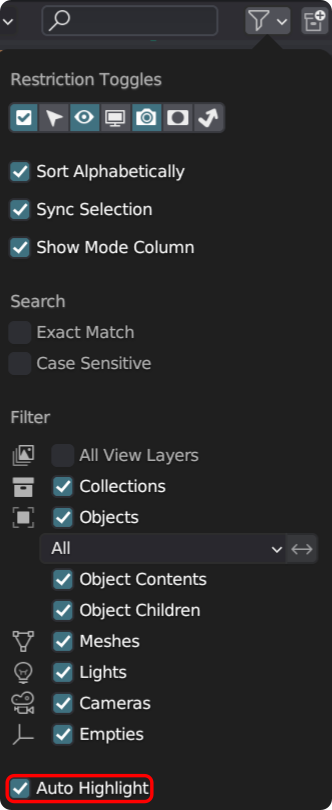
With Auto-Highlight enabled, a second toggle appears: Collapse Other Collections. Turn it on and every collection except the selected object's will be collapsed for you.
Release notes
- No longer requires pressing Shift+A when using Collapse other collections.
- Improved expansion of parented objects.
- Fixed the Outliner refreshing automatically even when the collection was already expanded.
- Added the ability to set the default state for new scenes.
- Added an option to show the actual object rather than parented objects (greyed out in the Outliner) when selecting an object with parents.
- Experimental support for expanding bones in pose mode.
- All collections of selected objects are now expanded automatically for better visibility.
- Fixed clicking in the Outliner triggering an unwanted jump to focus the object.
- Multiple Outliners, including those in other windows, are now supported.
- Full support for users who prefer right-click select over left-click.
Pair it with Clean Panels Pro
Bought too many great add-ons? Clean Panels Pro organises your N-Panel and speeds up Blender's boot time. It's 30% off until 13th September, 11:59 PM.